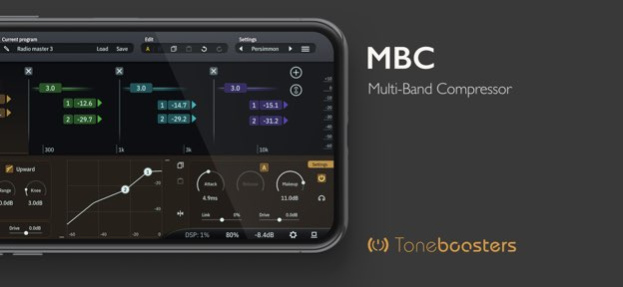
About TB MBC
TB MBC - the ultimate Multi-Band Compressor AUv3 plug-in TB MBC is a multi-band dynamics processor and analog saturator, providing a wealth of tools to sculpt your audio tracks. With up to 12 (!) fully configurable bands,...
TB MBC - the ultimate Multi-Band Compressor AUv3 plug-in TB MBC is a multi-band dynamics processor and analog saturator, providing a wealth of tools to sculpt your audio tracks. With up to 12 (!) fully configurable bands, 2 compressor curves per band, positive and negative saturation, and external side chain support, it is the most complete and versatile multi-band compressor available for iOS today. Features: - Up to 12 frequency bands! - Every band has two compressor curves - Upward and downward compression in each band - Positive and negative (expansive) saturation per band - Mid-side processing per band (for stereo input) - External side chain compression per band - Variable, positive and negative band linking per band - Manual or automatic, program-dependent release - Configurable compression knee and compression range parameters - Audition mode per band - 2nd order or 4th order cross-over network - Dry/wet mixing control for parallel / New York style compression - High Quality mode using internal oversampling - Spectrum analyser with various graphic presentation modes - Input and output gain parameters, and output digital VU meter - AUv3 with resizable UI and dozens of color themes to choose from - Preset management including import and export options - Undo, redo, A/B switching - High-quality output peak limiter What you should know: - Licenses acquired for this platform are not compatible with other platforms. - Audio Unit (AUv3) extensions require an iPad mini 2, iPad 4 or later models.
Version History This update provides significant workflow, customisation, personalisation and performance improvements: - Improved UI performance and reduced CPU load - Improved detection of drag vs click/tap logic for UI elements - Fix an issue with manual entry of automation lane values in certain hosts - New option to enable/disable GPU refresh throttling / high frame rate rendering - New option to enable highlighting of UI elements that accept keyboard input - New option to customize color scheme - Improved undo/redo functionality 1.4.8 May 30 Stability and efficiency improvements 1.4.5 09/29/2025 Stability, compatibility, and efficiency improvements 1.4.4 09/21/2025 Stability and efficiency improvements 1.4.2 06/30/2025 - New default settings system; default settings will need to be re-created after update - Removed deprecated Inter-App Audio compatibility The most intuitive multi-band compressor on iOS just got even better! - New feature to enable / disable piano keyboard - New attack, release, ceiling control parameters for output peak limiter - Tooltip improvements - New high resolution expand mode for detailed views of gain and threshold data - UI / UX and stability improvements 1.4.1 02/28/2025 - Spectrum analyzer efficiency improvements - PIano keyboard is now automatically removed to create more space for the spectrum editor for very wide aspect ratios 1.3.9 12/22/2024 Stability and efficiency improvements 1.3.8 08/28/2024 - Stability and efficiency improvements - Significant reduction in memory consumption 1.3.7 06/06/2024 Efficiency and performance improvements 1.3.4 04/26/2024 UI, UX and efficiency improvements Harmonize version numbers with macOS versions 1.3.0 06/20/2023 The most complete and professional multi-band compressor AUv3 plug-in just got even better! Version 1.2.5 has an improved efficiency and workflow, and exact gain meter values are now shown in the UI in various places for more control over your multi-band compression and saturation needs. 1.2.5 04/09/2023 Efficiency and stability improvements 1.2.3 01/14/2023 - Improved UI rendering - New app icons - Inproved handling of key commands for copy/paste/undo/redo 1.2.2 01/04/2023 - Usability and efficiency improvements - Band cross-over frequencies can now be entered manually if needed (single tap on the frequency divider) - Threshold values can be entered from vertical sliders directly if needed 1.2.0 12/05/2022 - Auto dimming of display now works correctly if bypass switch is toggled really quickly in succession - Improved support for linking bypass states between plugin and host 1.1.2 10/08/2022 New functionality: - Per-band compressor drive control - per-band positive and negative band linking control; negative values will use other bands instead of the target band UI improvements - Larger toggle buttons - Improved UI spacing - Improved highlighting of the selected band - New option to drag all make-up or threshold sliders up and down simultaneously - New option to change compression ratio by using mousewheel when hovering threshold slider Signal processing improvements - Faster channel scanning / initialisation - Various performance optimisations - Improved support for non-conventional audio sampling rates - Reduced latency in non-oversampling modes - Resolved a bug that could lead to a stereo image shift for saturation in one-band mode Content - New presets - App is now listed under 'Music' instead of 'Entertainment' 1.1.0 08/08/2022 1.0.2 08/02/2022
Previous Versions
Here you can find the changelog of TB MBC since it was posted on our website on 2023-09-07 13:22:25.
The latest version is 1.4.8 and it was updated on 2026-10-06 14:29:25. See below the changes in each version.
TB MBC version 1.4.8
Updated At: 2026-10-06
Changes: Version History This update provides significant workflow, customisation, personalisation and performance improvements:
- Improved UI performance and reduced CPU load
- Improved detection of drag vs click/tap logic for UI elements
- Fix an issue with manual entry of automation lane values in certain hosts
- New option to enable/disable GPU refresh throttling / high frame rate rendering
- New option to enable highlighting of UI elements that accept keyboard input
- New option to customize color scheme
- Improved undo/redo functionality 1.4.8 May 30 Stability and efficiency improvements 1.4.5 09/29/2025 Stability, compatibility, and efficiency improvements 1.4.4 09/21/2025 Stability and efficiency improvements 1.4.2 06/30/2025 - New default settings system; default settings will need to be re-created after update
- Removed deprecated Inter-App Audio compatibility
The most intuitive multi-band compressor on iOS just got even better!
- New feature to enable / disable piano keyboard
- New attack, release, ceiling control parameters for output peak limiter
- Tooltip improvements
- New high resolution expand mode for detailed views of gain and threshold data
- UI / UX and stability improvements 1.4.1 02/28/2025 - Spectrum analyzer efficiency improvements
- PIano keyboard is now automatically removed to create more space for the spectrum editor for very wide aspect ratios 1.3.9 12/22/2024 Stability and efficiency improvements 1.3.8 08/28/2024 - Stability and efficiency improvements
- Significant reduction in memory consumption 1.3.7 06/06/2024 Efficiency and performance improvements 1.3.4 04/26/2024 UI, UX and efficiency improvements
Harmonize version numbers with macOS versions 1.3.0 06/20/2023 The most complete and professional multi-band compressor AUv3 plug-in just got even better! Version 1.2.5 has an improved efficiency and workflow, and exact gain meter values are now shown in the UI in various places for more control over your multi-band compression and saturation needs. 1.2.5 04/09/2023 Efficiency and stability improvements 1.2.3 01/14/2023 - Improved UI rendering
- New app icons
- Inproved handling of key commands for copy/paste/undo/redo 1.2.2 01/04/2023 - Usability and efficiency improvements
- Band cross-over frequencies can now be entered manually if needed (single tap on the frequency divider)
- Threshold values can be entered from vertical sliders directly if needed 1.2.0 12/05/2022 - Auto dimming of display now works correctly if bypass switch is toggled really quickly in succession
- Improved support for linking bypass states between plugin and host 1.1.2 10/08/2022 New functionality:
- Per-band compressor drive control
- per-band positive and negative band linking control; negative values will use other bands instead of the target band
UI improvements
- Larger toggle buttons
- Improved UI spacing
- Improved highlighting of the selected band
- New option to drag all make-up or threshold sliders up and down simultaneously
- New option to change compression ratio by using mousewheel when hovering threshold slider
Signal processing improvements
- Faster channel scanning / initialisation
- Various performance optimisations
- Improved support for non-conventional audio sampling rates
- Reduced latency in non-oversampling modes
- Resolved a bug that could lead to a stereo image shift for saturation in one-band mode
Content
- New presets
- App is now listed under 'Music' instead of 'Entertainment' 1.1.0 08/08/2022 1.0.2 08/02/2022
TB MBC version 1.4.8
Updated At: 2026-06-03
Changes: Version History This update provides significant workflow, customisation, personalisation and performance improvements:
- Improved UI performance and reduced CPU load
- Improved detection of drag vs click/tap logic for UI elements
- Fix an issue with manual entry of automation lane values in certain hosts
- New option to enable/disable GPU refresh throttling / high frame rate rendering
- New option to enable highlighting of UI elements that accept keyboard input
- New option to customize color scheme
- Improved undo/redo functionality 1.4.8 4d ago Stability and efficiency improvements 1.4.5 09/29/2025 Stability, compatibility, and efficiency improvements 1.4.4 09/21/2025 Stability and efficiency improvements 1.4.2 06/30/2025 - New default settings system; default settings will need to be re-created after update
- Removed deprecated Inter-App Audio compatibility
The most intuitive multi-band compressor on iOS just got even better!
- New feature to enable / disable piano keyboard
- New attack, release, ceiling control parameters for output peak limiter
- Tooltip improvements
- New high resolution expand mode for detailed views of gain and threshold data
- UI / UX and stability improvements 1.4.1 02/28/2025 - Spectrum analyzer efficiency improvements
- PIano keyboard is now automatically removed to create more space for the spectrum editor for very wide aspect ratios 1.3.9 12/22/2024 Stability and efficiency improvements 1.3.8 08/28/2024 - Stability and efficiency improvements
- Significant reduction in memory consumption 1.3.7 06/06/2024 Efficiency and performance improvements 1.3.4 04/26/2024 UI, UX and efficiency improvements
Harmonize version numbers with macOS versions 1.3.0 06/20/2023 The most complete and professional multi-band compressor AUv3 plug-in just got even better! Version 1.2.5 has an improved efficiency and workflow, and exact gain meter values are now shown in the UI in various places for more control over your multi-band compression and saturation needs. 1.2.5 04/09/2023 Efficiency and stability improvements 1.2.3 01/14/2023 - Improved UI rendering
- New app icons
- Inproved handling of key commands for copy/paste/undo/redo 1.2.2 01/04/2023 - Usability and efficiency improvements
- Band cross-over frequencies can now be entered manually if needed (single tap on the frequency divider)
- Threshold values can be entered from vertical sliders directly if needed 1.2.0 12/05/2022 - Auto dimming of display now works correctly if bypass switch is toggled really quickly in succession
- Improved support for linking bypass states between plugin and host 1.1.2 10/08/2022 New functionality:
- Per-band compressor drive control
- per-band positive and negative band linking control; negative values will use other bands instead of the target band
UI improvements
- Larger toggle buttons
- Improved UI spacing
- Improved highlighting of the selected band
- New option to drag all make-up or threshold sliders up and down simultaneously
- New option to change compression ratio by using mousewheel when hovering threshold slider
Signal processing improvements
- Faster channel scanning / initialisation
- Various performance optimisations
- Improved support for non-conventional audio sampling rates
- Reduced latency in non-oversampling modes
- Resolved a bug that could lead to a stereo image shift for saturation in one-band mode
Content
- New presets
- App is now listed under 'Music' instead of 'Entertainment' 1.1.0 08/08/2022 1.0.2 08/02/2022
TB MBC version 1.4.5
Updated At: 2025-09-29
Changes: Sep 29, 2025
Version 1.4.5
Stability and efficiency improvements
TB MBC version 1.4.5
Updated At: 2025-09-29
Changes: Stability and efficiency improvements
TB MBC version 1.4.2
Updated At: 2025-06-30
Changes: Jun 30, 2025
Version 1.4.2
Stability and efficiency improvements
TB MBC version 1.4.1
Updated At: 2025-02-28
Changes: Feb 28, 2025
Version 1.4.1
- New default settings system; default settings will need to be re-created after update
- Removed deprecated Inter-App Audio compatibility
The most intuitive multi-band compressor on iOS just got even better!
- New feature to enable / disable piano keyboard
- New attack, release, ceiling control parameters for output peak limiter
- Tooltip improvements
- New high resolution expand mode for detailed views of gain and threshold data
- UI / UX and stability improvements
TB MBC version 1.3.9
Updated At: 2024-12-22
Changes: Dec 22, 2024
Version 1.3.9
- Spectrum analyzer efficiency improvements
- PIano keyboard is now automatically removed to create more space for the spectrum editor for very wide aspect ratios
TB MBC version 1.3.8
Updated At: 2024-08-28
Changes: Aug 28, 2024
Version 1.3.8
Stability and efficiency improvements
TB MBC version 1.3.7
Updated At: 2024-06-06
Changes: Jun 6, 2024
Version 1.3.7
- Stability and efficiency improvements
- Significant reduction in memory consumption
TB MBC version 1.3.4
Updated At: 2024-04-26
Changes: Apr 26, 2024
Version 1.3.4
Efficiency and performance improvements
Disclaimer
Official App Store Link
We do not host TB MBC on our servers. We did not scan it for viruses, adware, spyware or other type of malware. This app is hosted by Apple and passed their terms and conditions to be listed there. We recommend caution when installing it.
The App Store link for TB MBC is provided to you by apps112.com without any warranties, representations or guarantees of any kind, so access it at your own risk.
If you have questions regarding this particular app contact the publisher directly. For questions about the functionalities of apps112.com contact us.